Web browser color management guide

Editor note:
This content is now obsolete, and that's a good thing. In the past few years, the main browsers adopted sane color management strategies and defaults. In 2019, Safari, Chrome and Firefox all pass our browser color management test. Firefox now has the worst color management support for not interpreting untagged images and page elements as sRGB by default, requiring a manual configuration to do so.
We'll update this guide soon with comprehensive tests of all browsers, including mobile devices. Stay tuned.
What is color management?
In an ideal world, every camera, screen, and printer would display color in the same way. Unfortunately, that’s not how it works in practice. Due not only to the inherent differences in all those mediums, but also production inconsistencies from unit to unit, color is different on each device. Color management is the ensemble of practices and technologies used to make all those different pieces talk the same language. A color profile is a dictionary, a description of how that particular device reproduces color; it allows us to preview and translate color, leading to color accurate reproduction among different devices and even mediums, like paper versus screen.
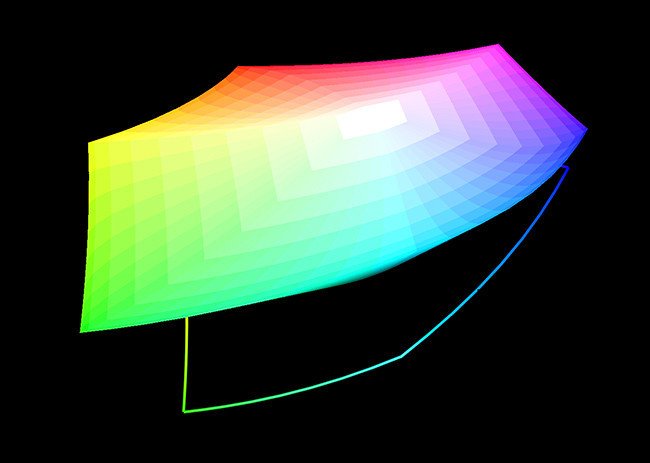
3D representation of the sRGB color space.
Color management is more than just printing
We tend to think color management and profiles equals printing and monitor calibration. But as web content consumption skyrockets, what are we doing to bring more accurate color to the internet?
This question was not apparent to me until recently. My web workflow followed the common denominator wisdom: convert your images to sRGB and they’ll look fine even on really bad screens. I wasn’t even tagging my files: sparing less than 3kb on each JPG seemed more important than embedding a profile.
What brought me to the light was buying a new wide gamut LCD monitor, more specifically a very nice Dell 3008WFP 30" display. This monitor has a wide color gamut covering almost the full AdobeRGB spectrum. This means it is able to display much more vibrant colors than a typical office LCD or even my previous Apple Cinema Display. When this new monitor arrived, suddenly all web pages looked like landscapes from Mars, with fluorescent colors, and every skin tone looked like it had just arrived from a vacation on the Caribbean without any sunscreen. It was that bad.
Color management to the rescue
I’ve been a color geek since starting to work as a designer. At that time, all I could do was adjust the gamma of my monitor using some simple visual tools, and download canned profiles for my printer, which really didn’t work at all. I dreamed of buying a real spectophotometer or colorimeter to calibrate my screen and create custom printer profiles, but this hardware was extremely expensive.
More than ten years passed and nowadays it’s cheap, accurate, and easy to calibrate your display and also generate custom printer profiles. I currently use a X-Rite i1 Display Pro for my LCD and a Colormunki Photo with ArgyllCMS to create printer profiles. This way I’m able to produce color accurate design proofs and also print my own photographs in fine art quality, using an Epson medium format printer. Display to print matching is excellent. Even canned profiles that come with most photo inkjets are really good nowadays. Spending less than US $200 on a monitor calibrator is a really smart investment.
But the importance of fully embracing this technology on the web never occurred to me.
Why tagging images for the web is not a complete answer?
Because web pages are made of much more than images, and all those elements should have predictable color, including CSS elements. Having color correct images is just a part of it.
Take, for example, the screenshot below. It’s a comparison of how Mozilla Firefox and Apple Safari web browsers render colors on page elements and untagged JPG files, for my wide gamut display. Both boxes should be the same color, but Safari, on the right, assumes the full monitor gamut for untagged JPGs and page elements, leading to distorted colors.
Web designs are made of much more than images; new technologies like CSS3, HTML5, and the rise of web typography make non-bitmap page elements more and more important. Also, GIF files don’t support embedded ICC profiles and they shouldn’t anyway: Why embed a 3kb profile on a simple background image that may be less than 1kb? As a result, W3C—the consortium that regulates web standards—determined that all untagged graphics should be assumed as sRGB.

Firefox vs. Safari color rendering on a wide gamut display. This image is a small capture of the genius Atlantis demo, by Frank Chimero, at the Lost World's Fairs website.
About sRGB
sRGB is a minimum common denominator color space. It was created by Microsoft and HP in 1996 and represents typical office or home viewing equipment and conditions. It has a small color gamut that can be accurately reproduced by almost all devices.
Never use sRGB as your main working color space, since it’s smaller than most digital camera color spaces, leading to unnecessarily clipped colors. Work on a bigger color space like Adobe RGB, or preferably ProPhotoRGB, and convert to sRGB only on output when preparing images for the web.
Color management support by browser
Who gets it right?
Browser test
Test your browser's color management support
Mozilla Firefox is the only browser than gives us some control on how to handle untagged images and CSS elements. Unfortunately, it comes configured by default to enable color management only for tagged images. In order to extend it to all page graphics, assuming sRGB for any untagged element, users should access an advanced configuration menu. Automatic integration with the operating system color management would be much better, although it’s understandable why they went this route.
Bobby Holley, one of the engineers involved with Firefox color management implementation, published an interesting article at the time Firefox 3.5 beta was launched, and cited how many users have corrupted monitor profiles on their systems. Enabling color management by default led to wacky colors in those cases. Also, there’s a small performance penalty. According to Bobby, it’s currently below 5%, but was 20–30% when they first started to implement it. His colleague, Jeff Muizelaar, also shares some of the process developing the new Firefox color management support and getting it up to speed.
Firefox 8 adds ICC v4 color profiles support and keeps all the controls introduces in Firefox 3.5, making it the first browser to offer a complete set of color management capabilities.
How to:
Other browsers limitations
Apple Safari
Safari supports both v2 and v4 ICC profiles. Unfortunately, it has no control over color on other page elements. Tagged images look right, but every other page element has over-saturated colors on a wide gamut LCD.
Google Chrome
Chrome is not a color managed browser, but there's some movement in this direction. Chrome 16, currently in beta, is the first version to offer ICC v2 and v4 color profiles support on the Mac OS X platform. The Windows version still doesn't have any color profiles support, but offers a command line switch to treat all images and page elements as sRGB, avoiding over-saturation problems for wide gamut display users. What we need now is a combination of both. :)
Microsoft Internet Explorer
Internet Explorer 9, released on March 15th 2011, is the first version to support color management. Like webKit-based browsers, untagged images and page elements are assumed to be on the full monitor gamut. All previous Internet Explorer versions aren’t color managed.
There's a key flaw in IE9 color management implementation: Unlike Firefox and Safari, the monitor profile is ignored during the color conversion. Internet Explorer 9 assumes your display is sRGB and ignores any color profile associated with it. This means that IE9 cannot be trusted for any critical color evaluation and wide gamut displays will still show overly saturated images. More information at this Luminous Landscape forum topic and also this thread at Adobe.com.
Opera
Opera doesn’t support color management at all. ICC profiles embedded in images are ignored and the whole page is rendered on the monitor colorspace.
Alternative fix: reduce your monitor color gamut
Besides asking browser developers to fully support color management on their software, there’s a workaround we can use on most wide gamut LCDs to make web colors look right: reduce their gamut temporarily. Most of those displays have a “color mode” or "color presets" menu on their controls that allows you to apply an sRGB simulation to the monitor.
The workaround would be to switch the display to sRGB and produce a color profile specific for that mode. When browsing the web, you’d select the sRGB profile and switch the display to sRGB by using its on-screen controls.
Depending on how you use your computer it could work for you, but clearly it doesn’t work for me since I browse the web while I work on Photoshop and other color managed programs, where a large gamut would be beneficial.
I’ll stick with Firefox for now, even though Chrome, Safari, and Opera are much faster on the Mac.
Best practices and recommendations
Assume sRGB for untagged files and unsupported formats like GIF, as the W3C recommends.
Work on a bigger color space, like AdobeRGB or ProPhotoRGB, but always convert to sRGB during export.
Always tag your JPG images. Use a larger colorspace, like AdobeRGB, only if your site’s audience uses high end monitors. Examples are a high end advertising photography website or a client area on your website where you can have control of your users’ display configurations.
PNG files are tagged by default on Photoshop, even though the program doesn’t allow us to select the “Embed color profile” option. If you don’t need any color profile tagging on your PNG files, try pngcrush to strip it from your files’ headers and make them a little smaller.
Ask browser developers to fully embrace color management and give users options on how the software should treat untagged images and page elements.
Comments
This is great stuff, specially handy to have all the links + tips on color management in one nice article. Thanks!
Even in Firefox, where it works pretty well, color management has a lot of limitation. You might have two monitors but you can only set one profile. If you end up with one native sRGB and one wide gamut monitor, this basically means you can only use Firefox on one monitor.
And this is just web stuff. I've found using wide gamut for normal things, just Excel or whatever, painfully blows out the colors. I can't help but wonder why wide gamut is even a feature at this point. The only time I appreciate it is in photoshop, as that's the only app that really supports it right. And I don't use photoshop!
I've never thought before of this two monitor setup for web browsing, but it is a real problem. I wish browser developers stepped it up and fully embraced color management, but it seems that the main metric on the browser market is performance and everybody is moving primarily on that direction.
Wide gamut displays work great for photography work, since most modern SLRs and photo printers can reproduce colors outside the sRGB colorspace. Besides Photoshop, all RAW developers that I know are color managed and make good use of that extra gamut.
This is well-written, knowledgable, and pretty much right on the money in terms of the current state of color management on the web.
The only point I might argue is that the implied goal here seems to be to get all elements in all cases to display as sRGB. Fine and dandy as far as getting rid of garish effects on large-gamut monitors and getting images and backgrounds to match, but understand if that's the goal, then you're taking all that capability you paid for with your cool new monitor and tossing it out the window.
Also understand that if that's the goal no image will display exactly 100% correctly. Currently, in order to get its result, Firefox honors profiles of all embedded images, but then converts them to sRGB. So if you want to post in Adobe 1998 or some other large gamut space, well, tough. Then after that, all elements of the page are assigned the monitor profile for display. This makes for even smooth background transitions and less-than-horrible results on large-gamut tagged images, but it's not true color management and even sRGB images are displayed as inaccurately as whatever the difference is between the viewing monitor profile and sRGB.
Currently only Safari both respects embedded profiles in images , and then converts them to the monitor profile in their embedded space. Obviously this is the best way to display images, but as pointed out here, it creates issues with all other elements.
Years ago I read there was going to be a web standard for an html tag for icc profiles. I even saw a sample of it. That is the actual ultimate answer. Just a tag describing the intended space of all elements of a page, readable by color-managed browsers and ignored by others.
Seems easy enough to me, but it also seems as if it's never been done. And that's a shame.
Thank you for your insights on this matter, Correct Color.
I've heard too of that ICC meta tag while researching for this article. It's a great idea and the only way I can see a fully color managed web working. You're absolutely right when you say assuming sRGB is just a waste of the most modern displays capabilities.
My defense of sRGB is for untagged elements only, while we don't have a more elegant solution. My understanding of Firefox color management is that the gfx.color_management.mode switch makes it assume sRGB only for untagged images, and not the whole page, so we're not actually reducing it all down to sRGB, but only CSS graphs and untagged JPGs.
I can confirm that by looking at the ProPhotoRGB tagged image at the browser color management test. It's clearly more saturated than the sRGB and untagged blocks, showing that Firefox is honoring the larger color profile.
The web browser market seems to be currently driven primarily by performance and I assume that's one reason to leave color management aside. It seems that all developers are working on one form or another of GPU acceleration and in the future we may see hardware based ICC color transformations, paving the road for color management while maintaining good performance.
Author of article totally forgot that it´s useless to have converted embedded profile without converting colours through monitor profile. They are needed two conversions of colours to achieve correct collours on your monitors! That´s how profile´s logic works :-). I shocked that on internet nobody talked about it to you. So back to web browsers. Although Firefox and Safari can read ICC profiles, and the pictures are converted and displayed with embedded profiles, you can´t see correct colours, because web browsers does not support conversion of monitor profile :-). So in the end a web browser without ICC profile reading capability can have better results. :-) But I have very good news for you, the new IE9 does this right. It´s mainly MS fault that with ICC profiles are so many troubles, so in the end it´s good that MS fix it, late but first with correct web browser colours.
pyramidak, both Firefox and Safari take monitor profiles into consideration and do convert the colors using your monitor profile when displaying images with embedded ICC profiles. IE9 does it too, but fails to appropriately handle untagged images, which is also my main gripe with Safari and Chrome on wide gamut displays. If you'd like to test it, try assigning an invalid ICC profile on Firefox and see how colors change.
Keep in mind, though, that you should specify your display profile manually on Firefox by using the about:config panel.
This is incorrect. IE9 certainly respects the embedded image profile, but it does not respect the monitor profile, it just converts it to the full monitor colour space. Totally useless on a wide gamut display.
I had high hopes for IE9, but turns out it's a joke. Only Firefox has got it right.
Jonathan, you're absolutely right on this one. IE9 respects the embedded profile but fails to take the monitor profile into account, so it's not a real color managed browser. This applies to the beta and I was able to confirm it. I don't know yet if this will change when the final version is released. Hope so.
Firefox 8.0/9.0 has ICCv4 support.
https://bugzilla.mozilla.org/show_bug.cgi?id=674230
https://bugzilla.mozilla.org/show_bug.cgi?id=488800#c137
Thanks for the heads up. Good to know.
…And yet it still fails the ICCv4 test on this site (http://gearoracle.com/tools/web-browser-color-management-test/).
My useragent and config:
Mozilla/5.0 (Macintosh; Intel Mac OS X 10.6; rv:9.0a2) Gecko/20111101 Firefox/9.0a2 ID:20111101042022
gfx.color_management.display_profile;[path to my display profile]
gfx.color_management.enablev4;true
gfx.color_management.mode;1
gfx.color_management.rendering_intent;0
Do I have something misconfigured?
I have the same config here and my results are the same as yours: no ICC v4 support. I don't think there's any config error on the browser.
This may be some incompatibility with the special ICC profile I have designed for this test. I'll investigate it and get back to you soon.
Thank you for your comment.
Thanks for the reply, and for the fix. I'm seeing some really amusing behavior now, though: http://imgur.com/NdM17
It's the browser cache. Control + reload the page and it'll show the right colors. I'll change the file name on that image just to make sure this doesn't happen to other users. Thanks for posting.
Jabberwocky, the was indeed an error on the wacked profile I've created for the web browser color management test. This was causing some kind of incompatibility with Firefox 8 and 9, causing those browsers to ignore the embedded profile. It's now fixed and I can confirm both Firefox 8 and 9 support ICC v4 profiles.
Thanks for pointing the error.
You probably already did this:
gfx.color_management.mode:2
Then it takes the monitor profile into consideration.
Sorry, I mislead you. The correct value for color management mode is 1.
Your settings are correct, no need to change.
Hello,
May I know, on the OS level for example in Win 7 desktop, windows explorer etc. when used with a wide gamut lcd, will it display the untagged stuffs (icons, wallpaper, windows explorer pane etc.) as SRGB or default to the full gamut of the lcd? How about in MacOS?
I know that in color managed apps it will be displayed correctly but i wonder how will they look in the OS environment itself (desktop, win explorer, etc.)
Syakir,
Mac OS X desktop and UI elements are color managed since 10.6, Snow Leopard. While my desktop looked oversaturated in 10.5, the release of Snow Leopard fixed it completely and also changed the default OS gamma to 2.2. Lion, 10.7, kept this this behavior.
For Windows 7, on the other hand, I have seen pretty conflicting information. There are some reports online of users seeing correct desktop and UI color with wide gamut displays, but also lots of reports saying the contrary.
My own tests show that Windows 7 doesn't color manage the desktop and UI elements. Everything is displayed on the full monitor gamut, leading to oversaturated colors for wide gamut display users.
I wonder if these conflicting results may have been caused by different video card drivers. This tech support question hints at this. I could not find any official information from Microsoft on this issue.
Thank you. From my test, its like u said, oversaturated on the UI.
My experience with Windows 7 is that the desktop, etc. will only display correctly if you embed your specific wide-gamut display profile in an image for viewing in non-color managed apps, desktop, etc... if that makes any sense.
For instance, I created a desktop wallpaper that I had embedded the AdobeRGB profile in it. On my windows desktop the image took on a green tinge and over-saturated. Changing it to SRGB or other "typical" wide-gamut profiles always led to similar results although perhaps with a different tinge.
The solution for getting my wallpaper to show up "correctly" was to actually embed the profile associated with my monitor. It's a bit of a hassle as it seems Windows can't read that an image has a profile and convert between them for display like Photoshop, Safari, etc can.
Hey it's me, from the Create vs. Intuos article ...I just found this. You are a hero. Oracle indeed.
Just thought I'd reiterate. :D
<3
I've found a temporary workaround for the wide gamut issue on Chrome for the Mac.
1. Quit Chrome
2. Set the display profile to sRGB in Display Preferences
3. Start up Chrome
4. Revert your display profile to your monitor profile
Now Chrome and Firefox display exactly the same. Compare it to the "smarter" Safari that updates to the actual display profile. On Safari the colors are much more saturated. It's not really a scientific solution but for the time being it seems to work. I think as soon as Chrome gets real color management it will stop working.
Fuli42, that's a really interesting idea. I was able to test it here in two different Chrome versions.
Chrome 15 works as you described. It loads the monitor profile a single time when you open the app. Loading it with sRGB as the monitor profile in Display Preferences forces all images and graphics to be interpreted on this color space.
Chrome 17 on the Mac supports ICC profiles, but this workaround doesn't work. It updates the display profile when you open a new tab or window, like Safari does.
This could be a temporary workaround for Chrome users with wide gamut displays, with a caveat: ICC profiles are not supported on Chrome 15 or earlier, so any image tagged with a larger than sRGB profile, like AdobeRGB, will be displayed with less saturation.
Thank you for your comment,
Yes, my "dream" would be to get Safari work on my wide-gamut display. I was searching for a way to turn off color management in Safari to make it work like the current version of Chrome. Unfortunately I couldn't find anything.
I'm subscribed to your blog so if anything comes up, please let us know with a new post!
Thank you,
Balint
https://bugzilla.mozilla.org/show_bug.cgi?id=679371
There's something weird going on with your ICC v4 test image.
Thank you for letting me know. There was a bug with the ICC v4 test image and I fixed it in November 2nd.
https://bugzilla.mozilla.org/show_bug.cgi?id=698519
Firefox 13.0 has updated to libjpeg-turbo 1.2.0, so JPEG images will decode faster. Everyone should update to Firefox 13.0 when it's released.
Thank you for the tip. I've noticed Firefox 8 and beyond are slow when decoding large images with embedded profiles. Glad they fixed it in the upcoming release.
Unfortunately it is not only the sad state of browsers but the sad state of the entire IT world. No regulation, no standards and therefore a complete hotpoch costing the world money everyday.
As of December 2015 Internet Explorer 11 seems even better in CM than Firefox. According to your test page, it supports v2 and v4 profiles, honor ProPhoto and sRGB profiles in bands, and correctly assigns sRGB to untagged images and CSS bands in lower part of the page.
Safari now respects untagged elements since version 10:
https://webkit.org/blog/6682/improving-color-on-the-web/
what about this article saying that Opera has ICC profile conversion? Doesn't that qualify as half-managed?
https://www.dpreview.com/forums/post/50208839
Screenshots of the Opera Web Browser color management test web page.
https://imgur.com/a/OnyuJ